Contracts form the basis of any business. They encapsulate all essential information on price, deadlines, regulations, responsibility, etc. Historically, this information would be locked away in paper files or PDF documents. People would have to spend time going through pages of text to locate one date or one number and then type this information manually into other software.
Nowadays, intelligent software can read contracts and automatically extract the most relevant information. This is a method called AI Contract Data Extraction. Extraction of the data is just one side of the coin. Storing that data in a separate contract management tool does not solve all issues. To truly leverage the value, you should integrate your contract data extraction tool directly with the applications your teams use daily. These include Contract Lifecycle Management (CLM), Enterprise Resource Planning (ERP), and Customer Relationship Management (CRM) systems.
Integrating these tools revolutionizes business operations. It eliminates manual work, reduces errors, and speeds up the flow of information between departments.
Integration with CLM Systems
A Contract Lifecycle Management (CLM) system manages contracts from drafting and negotiation to execution, renewals, and expiration. Placing AI contract data extraction within your CLM considerably enhances the capabilities of the system.
Rather than a person opening each signed document and typing in contract end dates, vendor names, or payment conditions, the AI scans the document rapidly. It locates these details and updates the contract profile automatically.
The following are some great advantages of this integration:
- Search Immediately: Since the system tags each contract with the appropriate dates and names, executing a search across your entire library will take only a few seconds. For instance, you can locate all contracts that will be expiring next month without even looking at any PDF files.
- Reminders That Are Automatically Generated: The CLM is able to recognize the renewal dates that the AI has extracted. It has the capability to dispatch an email message to the account manager notifying him or her of the situation 60 days in advance of the contract expiration date so that they will never be caught off guard by a renewal deadline.
- Monitoring of Contractual Commitments: Contracts define various commitments such as the submission of a report or the achievement of a milestone. The combined system is capable of detecting these commitments and keeping a record of them, ensuring that the business remains compliant.
Integrating With ERP Systems
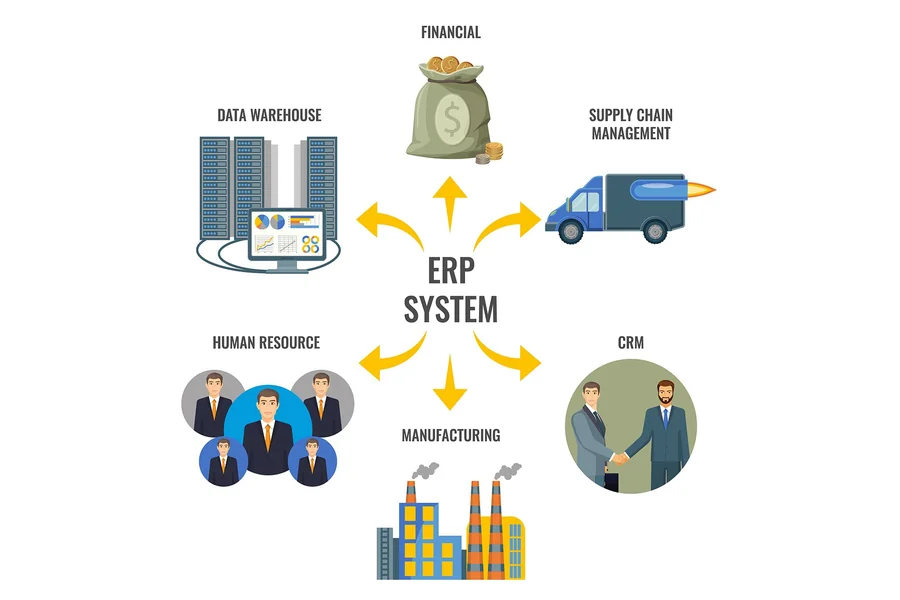
An ERP system is responsible for managing the day-to-day tasks of a company such as finance, purchasing, inventory, and billing. Contracts determine who pays the suppliers and how much, and who gets the money from paying customers and how much. Financial errors arise when the details in your contracts are not in harmony with your ERP data.
When you integrate contract data extraction with your ERP system, the extracted data is directly input into the financial ledgers and calendars. If, for instance, a new supplier contract specifies that payment is due 30 days after the invoice is received, the AI extracts Net 30 and informs the ERP finance module of that term.
Among other things, this integration frees you from the common financial errors such as:
- Correct Invoicing: With an ERP system, billing schedules can be automatically generated according to the contract terms, such as pricing and payment dates.
- Checking Invoices: An ERP system can be set to go one step further and compare the invoice price to the price extracted from the contract. If a supplier overcharges the company, the discrepancy can be detected before payment is processed.
- Improved Purchasing: Buyers have visibility of the exact terms set forth in the contracts with vendors, and they are thus able to carry out their orders in accordance with the proper contract conditions.
Connecting with CRM Systems
CRM software allows salespeople to record data about their clients, prospective customers, and sales opportunities. Sales personnel, of course, dedicate most of their time to finalizing transactions. They only switch to other tasks when a client has signed a contract, at which point the focus goes to account setup.
Connecting contract data capture to your CRM smooths the whole flow from deal closure to customer activation. AI interprets the signed document, identifies the customer’s official name, address, ordered products, and service levels, and then immediately updates the CRM entry.
The greatest advantage here is the automation of customer onboarding. Previously, when a contract was signed, a salesperson had to send an email to the operations team, enter data into the CRM, and manually set the next steps. This created long delays for the customers.
Now, with the integrated solution, the signing of the agreement initiates a sequence of events:
- AI identifies the product and service options the customer purchased.
- The CRM is updated with the new data, and the customer is marked as an active account.
- The system generates and sends a personalized welcome email based on the purchased products and services.
- The technical department gets an automatic ticket to either provision the customer’s software accounts or arrange the delivery of physical goods.
This means automated customer onboarding takes minutes instead of days, thereby significantly improving the customer’s experience right from the start.
How to Plan the Integration
The first thing to do when connecting these systems is to prepare the ground properly. You cannot just turn the systems on; you have to plan how data will flow between different systems. The first step is to choose which fields are most relevant for your business. After all, grabbing all the words of a contract is not necessary. Concentrate on those pieces of data that will cause other systems to kick into action, e.g., contract values, start dates, termination rules, and names.
Secondly, make sure your records are in order before linking the systems. If in your CRM a customer’s name is one thing and in your ERP it is something else, then the integration will open up to errors. Set one name, ID, and term format standard for all platforms.
Third, you need to establish which actions the system will carry out automatically and which will require a human’s intervention to check the work. Despite the high accuracy of AI, the method that will provide the best results, especially for contracts that are of a great value or contain complicated clauses, is to have a team member perform a review prior to the data being updated in your main ERP or CRM platforms.
Conclusion
Reading contracts manually and continuously moving the extracted data to other systems not only slows business down but also leads to data silos, data entry mistakes, and poor customer service.
Integrating AI contract data extraction with your CLM, ERP, or CRM transforms your contract documents from being mere records into live data. Teams in legal, finance, and sales departments, for instance, will have the flow of information uninterrupted. Integrated systems can automatically perform many customer-related tasks, such as issuing invoices, updating CRM records, and supporting automated customer onboarding. Making just this one connection between the different software systems will lead to the elimination of a lot of manual work and to your business running more smoothly.