
Have you ever thought about why some videos instantly grab your attention while others don’t? Maybe you’re watching a tutorial but half the product is out of the frame. Or you come across a TikTok with big black bars on the sides. Chances are, you don’t stick around you swipe away.
That’s the power of framing. How you crop video can completely change how people see your content. The problem is, cropping and trimming aren’t the same thing. Mixing them up could hurt your views, engagement, and even sales if you’re posting professional content or ads.
And here’s where AI tools like Pippit’s AI lyrics generator come in. While it might sound like it only helps with adding captions or creative lines, it actually transforms your entire video creation workflow. It works alongside Smart Crop to ensure every frame, every lyric, and every visual aligns perfectly with your content, so your audience focuses on what matters most.
In this blog, we’ll break down cropping vs trimming in simple words, explore why both matter for creators and businesses, and walk through how to use Pippit AI’s Smart Crop tool and AI lyrics generator to make cropping effortless and impactful.
Cropping and trimming: two tools, two purposes
At first glance, cropping and trimming might sound like two ways to “cut” a video. But in reality, they solve completely different problems:
- Cropping is like framing a photo. You cut away the unwanted edges of a video so the focus stays on the most important part whether that’s a person’s face, a product, or a key moment. Cropping changes what the audience sees.
- Trimming is about time. You shorten a video by cutting off the beginning, end, or even parts in the middle to make it smoother and easier to watch.
Both are useful, but they’re not interchangeable. If you confuse them, you might end up with videos that look unprofessional or feel unnecessarily long.
When to crop and when trimming is enough
Creators often ask, “Should I crop or just trim?” The answer depends on the issue with your content:
- Crop when: the subject looks too small, black bars appear on the screen, or you want to reframe the video for platforms like TikTok, Instagram Reels, or YouTube Shorts.
- Trim when: your video feels too long, starts with awkward pauses, or contains extra content that doesn’t add value.
Here’s an example: imagine you recorded a cooking video horizontally on your phone but want to post it on TikTok. Trimming won’t fix the issue. You’ll need to crop it vertically (9:16) so the audience focuses on the dish, not the empty kitchen counter.
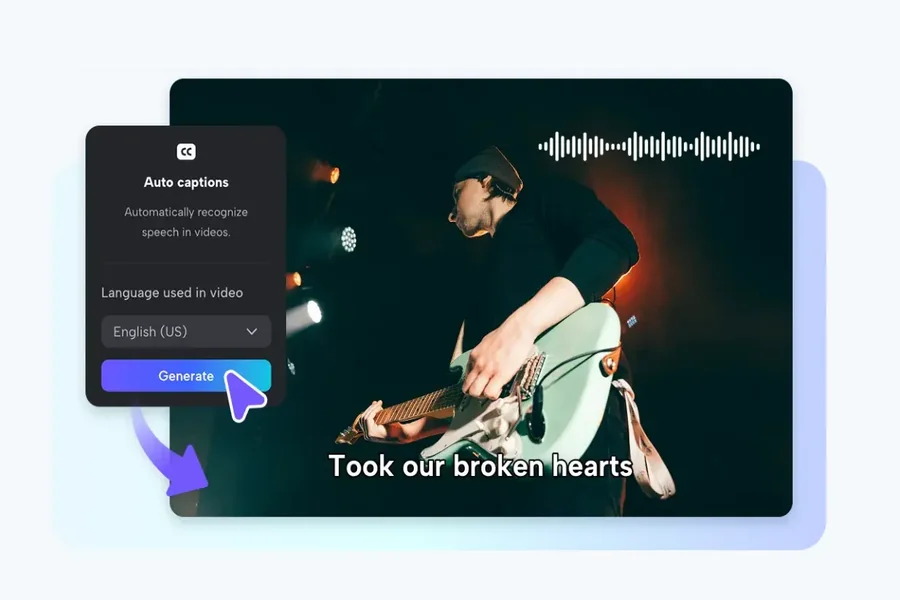
This is also where the AI lyrics generator adds value. By automatically generating captions or lyrical overlays, it ensures your trimmed or cropped video communicates the message clearly. Your audience doesn’t just see the video they understand the story, even with sound off.
Why aspect ratios make cropping non-negotiable
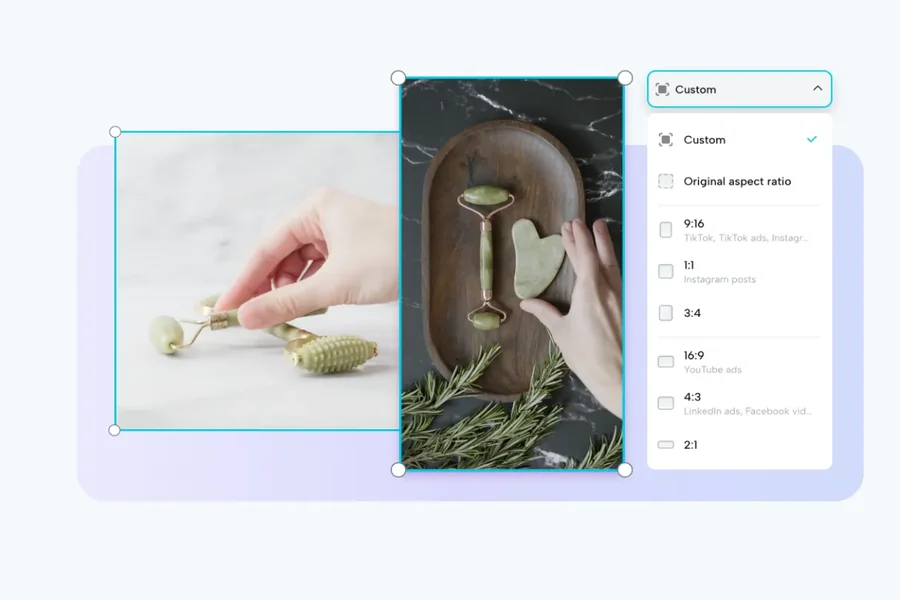
Every platform has its own “sweet spot” aspect ratio. If you don’t crop your videos correctly, they can look out of place:
- TikTok & Instagram Reels: 9:16 vertical, full-screen immersive.
- YouTube: 16:9 widescreen, perfect for storytelling.
- Instagram feed: 1:1 square or 4:5 portrait, ideal for stopping the scroll.
A video that looks professional on YouTube can flop on TikTok if it isn’t reframed. That’s why professional creators never just upload the same file everywhere they resize and crop for each platform.
Using the AI lyrics generator alongside cropping ensures that your captions or lyrical lines fit perfectly within the new frame. No more text getting cut off or awkwardly placed, everything is automatically aligned.
Step-by-step: how to crop video with Pippit AI Smart Crop
Forget complicated editing software. This is where Pippit shines. Its AI lyrics generator works in tandem with the Smart Crop tool to make cropping fast, accurate, and stress-free. Here’s how to crop your video in three simple steps:
Step 1: Upload your videos
Log in to Pippit and go to the Video generator tab. Select the Smart Crop tool and click Upload. You can import videos directly from your device, cloud storage, or saved files.
Step 2: Crop your videos
Choose from preset aspect ratios like 1:1 for Instagram or 9:16 for TikTok. Smart Crop automatically detects the subject and adjusts the frame perfectly.
Want more control? Manually crop to zoom in on a product, highlight expressions, or remove distractions all, while keeping quality intact. Meanwhile, the AI lyrics generator can add captions or lyrical overlays that match the timing of your content, so every moment is reinforced visually and audibly.
Step 3: Export your videos
Preview your cropped video, select your desired format and resolution, then click Export. You can even share directly to Instagram, YouTube, or TikTok with a single click—no. No extra downloads are needed.
And just like that, your video is platform-ready in minutes, with perfectly aligned captions or lyrics.
Why AI cropping outperforms manual editing
Yes, you can crop videos manually with editing software. But let’s be honest: it’s slow, frustrating, and easy to mess up.
- You’ll have to resize separately for every platform.
- One wrong move could cut off part of your subject.
- Hours get wasted on something AI can do in seconds.
With Pippit’s AI-powered cropping and lyrics generator, the subject stays centered, movements are tracked smoothly, and captions or lyrics appear in the perfect position. Simply upload, let the AI handle framing and text, and export no advanced editing skills required.
From cropped content to scroll-stopping ads
Here’s something many creators overlook: if you crop videos correctly, you’re already halfway to creating professional ads.
Why? Ads require clean, distraction-free framing. A messy background or cut-off product instantly makes viewers scroll away. With Smart Crop, your video is already polished and optimized for attention.
And the best part? Pippit doesn’t stop at cropping. Its AI lyrics generator and ad maker allow you to instantly transform your cropped, captioned video into a high-performing ad. Ready-to-use templates for TikTok, Instagram, and YouTube help you move from content creation to advertising without extra tools or a design team.
Cropping vs trimming: key takeaway
To sum it up:
- Cropping changes the frame, making your video look polished and professional.
- Trimming changes the length, making your video more engaging.
- Both matter, but cropping is often the hidden secret to videos that stand out online.
With the AI lyrics generator, every cropped frame can also carry perfectly timed captions or lyrics, boosting accessibility, engagement, and overall impact.
The best part? You don’t have to wrestle with complicated editing tools anymore. With Pippit AI’s Smart Crop, you crop once, share everywhere, and save hours of time.
Whether you’re creating for fun, building your brand, or running campaigns, Smart Crop and the AI lyrics generator ensure your videos are always framed to impress and communicate effectively.
So next time you edit, don’t just trim. Crop smartly, frame your story, and let your content shine.