
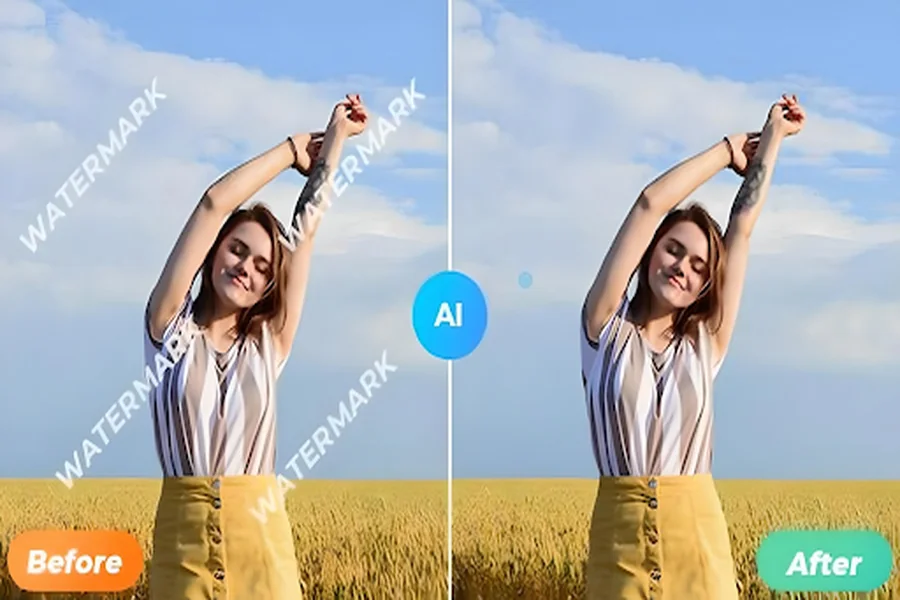
Removing watermarks from photos and videos has become a common need for creators, editors, and businesses who want clean, professional-looking visuals. With the rise of artificial intelligence, AI watermark removers now offer a quick, automated way to erase unwanted text or logos from images. But the big question is: Which AI watermark remover gives the best results?
In this article, we’ll explore how AI watermark removers work, compare top platforms, and highlight which tools deliver the most accurate and clean output.
How AI Watermark Removers Work
AI watermark removers use advanced algorithms such as inpainting, deep learning, and object detection to fill in the areas where the watermark appears. Instead of simply blurring or smudging the logo, modern AI tools understand the background and reconstruct it naturally.
This allows them to:
- Remove text, logos, and stamps without affecting image quality
- Rebuild missing pixels using smart texture generation
- Maintain high resolution
- Produce clean, realistic results
The effectiveness of each tool depends on its underlying AI model and training dataset.
Top AI Watermark Removers (2025)
Below are some of the most reliable and accurate AI watermark removal tools available today.
1. HitPaw Watermark Remover (AI-powered)
Best for: High-quality image reconstruction
HitPaw consistently ranks among the best because of its powerful inpainting engine. It can remove both simple and complex watermarks, even those covering textured backgrounds like grass, fabric, or skin.
Pros:
- Excellent detail reconstruction
- Works on photos and videos
- Smooth, clean removal
- Easy for beginners
Cons:
- Some features require a premium upgrade
- Output quality varies with extremely large watermarks
2. Vidwud AI Watermark Remover
Best for: Fast, fully automatic watermark cleanup
Vidwud AI is becoming popular due to its one-click watermark deletion feature. Users simply upload an image, and its AI model instantly detects and removes the watermark without manual brushing.
Pros:
- Free plan available
- Very fast processing
- Accurate on large watermarks
- No editing skills required
Cons:
- Limited editing customization
- Works best for clear, non-repetitive watermarks
3. Adobe Photoshop Generative Fill
Best for: Professional-grade results
Photoshop’s new AI tool, Generative Fill, has changed the editing industry. It offers extremely precise watermark removal by intelligently rebuilding missing background.
Pros:
- Professional-level, flawless edits
- Can handle complex backgrounds
- Great for photographers and designers
Cons:
- Requires Photoshop subscription
- Slight learning curve
4. WatermarkRemover.io (AI Online Tool)
Best for: Quick and free online use
This web-based platform is widely used for simple watermark removal tasks. It works entirely online and doesn’t require installation.
Pros:
- Free to use
- One-click removal
- No registration needed
Cons:
- Not ideal for complicated watermarks
- Slight loss in image sharpness
5. Inpaint AI Online
Best for: Manual control with AI assistance
Inpaint allows users to highlight the watermark area manually, giving precise control. Its AI then fills the selected section intelligently.
Pros:
- Good for detailed editing
- Works on tricky backgrounds
- Affordable
Cons:
- Requires manual brushing
- Slower compared to auto tools
Which AI Watermark Remover Gives the Best Results?
If you’re looking for the overall best AI watermark remover, the answer depends on your use case:
Best for Pure Quality: Adobe Photoshop Generative Fill
No tool matches Adobe’s generative AI when it comes to flawless reconstruction and ultra-clean background restoration.
Best Free Option: WatermarkRemover.io or Vidwud AI
Both platforms give impressive results for free and are ideal for quick tasks.
Best for Beginners: HitPaw & Vidwud AI
These tools are simple, automated, and offer great results for everyday watermark removal.
Best for Complex Edits: Inpaint & Photoshop
If the watermark covers faces, patterns, or detailed textures, these two tools produce the most natural-looking output.
Final Verdict
The best AI watermark remover depends on whether you prioritize quality, speed, or cost. For professional photographers or designers, Photoshop Generative Fill is unbeatable. For regular users looking for a free and fast solution, Vidwud AI or WatermarkRemover.io offers excellent performance.
AI technology continues to evolve rapidly, and watermark removers are now more powerful than ever. Regardless of which tool you choose, AI makes it easier to produce clean, watermark-free visuals in seconds—saving time, improving quality, and enhancing creativity.