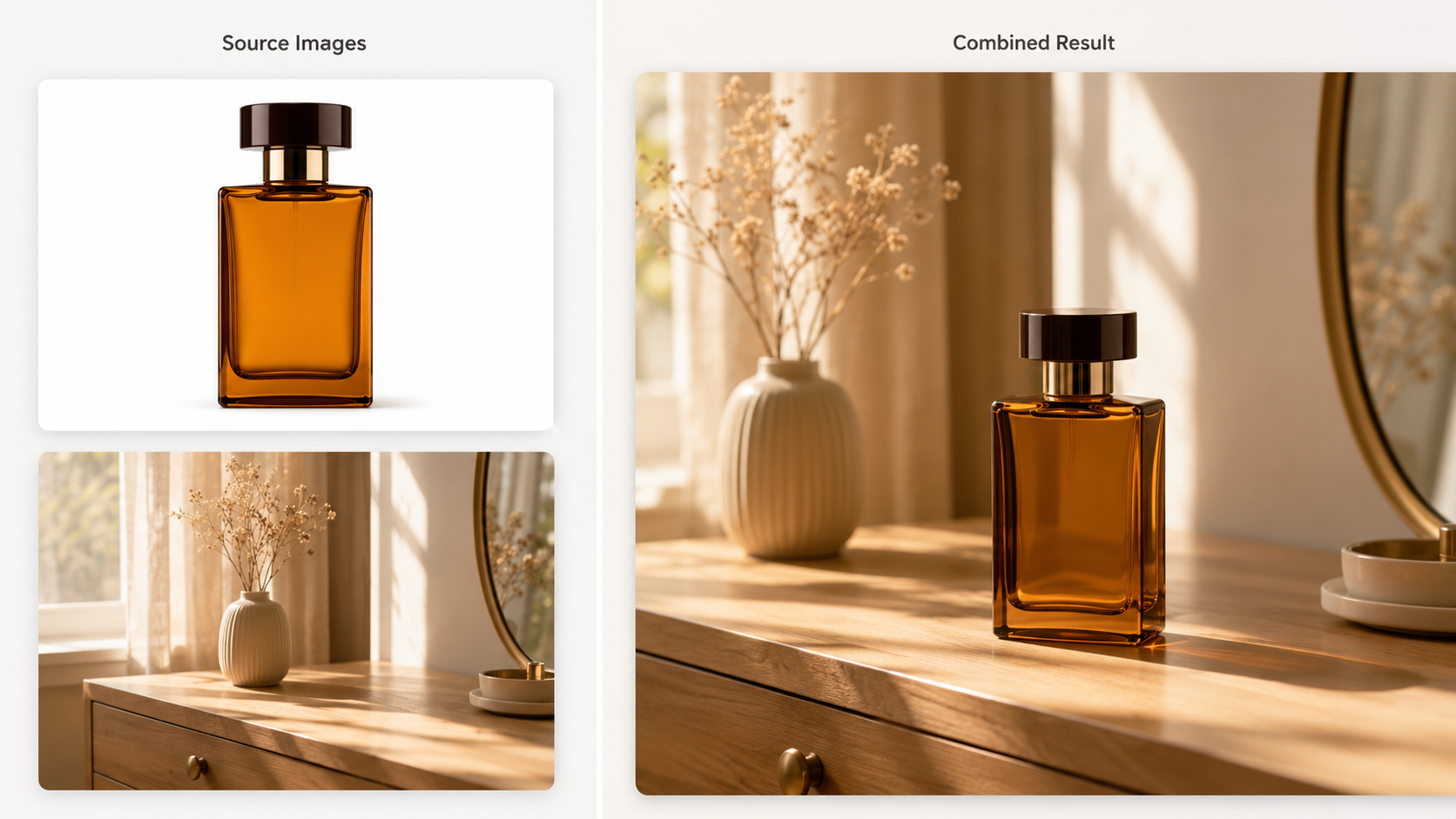
You have a product photo from last week’s shoot and a lifestyle background you found online. In your head, the two belong together — the product sitting naturally in that scene, lit correctly, shadows falling in the right places. But actually getting there means opening Photoshop, cutting out the subject, matching the color temperature, painting in shadows, and spending 45 minutes on what should be a five-minute idea.
Most people give up before they start. Not because the concept is hard, but because the execution requires skills and software that most people don’t use often enough to be fast at.
AI image tools have changed what’s practical for non-designers. Not just text to image generation — the more useful shift is working with photos you already have. Combining them, restyling them, turning them into something new. Pixlio is built around this idea: browser-based tools that handle the tedious editing steps so you focus on creative direction.
Two tools worth looking at: the AI image combiner and the AI embroidery generator. One merges separate photos into a single composition. The other turns images or text descriptions into embroidery-style artwork with visible stitch texture.
Combining Photos Without the Usual Editing Work
The image you need often doesn’t exist yet, but the pieces do. A product photo here, a background there. A portrait and a scene that fits the mood better. Maybe people from different photos who were never in the same room.
Doing this manually is where the time goes. Cutting out a subject cleanly, getting the scale right, matching lighting and shadows, blending edges so nothing looks pasted on — if any one detail is off, the whole thing looks fake.
Pixlio’s AI image combiner handles this differently. Upload your photos, pick a guided combine mode — Product in Scene, Subject into Background, Bring People Together, or Creative Blend — and the AI figures out the compositing. You can still write extra instructions to steer the result, but the masking, lighting adjustments, and edge blending happen automatically.
For ecommerce sellers, this turns a plain product shot into a lifestyle scene without booking a photo studio. For social media creators, it means custom thumbnails and cover images built from your own photos instead of generic stock. For personal use, it can bring people or pets from separate pictures into one frame. For designers, it works as a quick concepting step before the polished final version.
The real value isn’t that images end up in the same frame. It’s that Pixlio handles the details that normally eat your afternoon — blending, shadows, lighting, composition — while you decide what goes where.
Turning Photos and Ideas Into Embroidery-Style Artwork
Not every edit is about making photos look more realistic. Sometimes the goal is to make something feel more crafted or personal. That’s where Pixlio’s AI embroidery generator does something different.
You can start from a text description or upload an existing photo, sketch, or logo. The tool generates embroidery-style artwork — not machine files like PES or DST, but PNG or JPEG visuals that show what a stitched version might look like. Useful for client previews, creative posts, merch concepts, or planning before you invest time in real digitizing.
The style options matter here. Cross-stitch gives you that classic grid-based look. Patch or badge style works for bold shapes on jackets and caps. Outline or linework keeps things minimal. Satin fill produces the smooth, polished look you see on embroidered logos. You also get color palette controls — mono, two to three colors, pastel, or vivid — because embroidery looks best with simplified colors and clean edges, not photorealistic gradients.
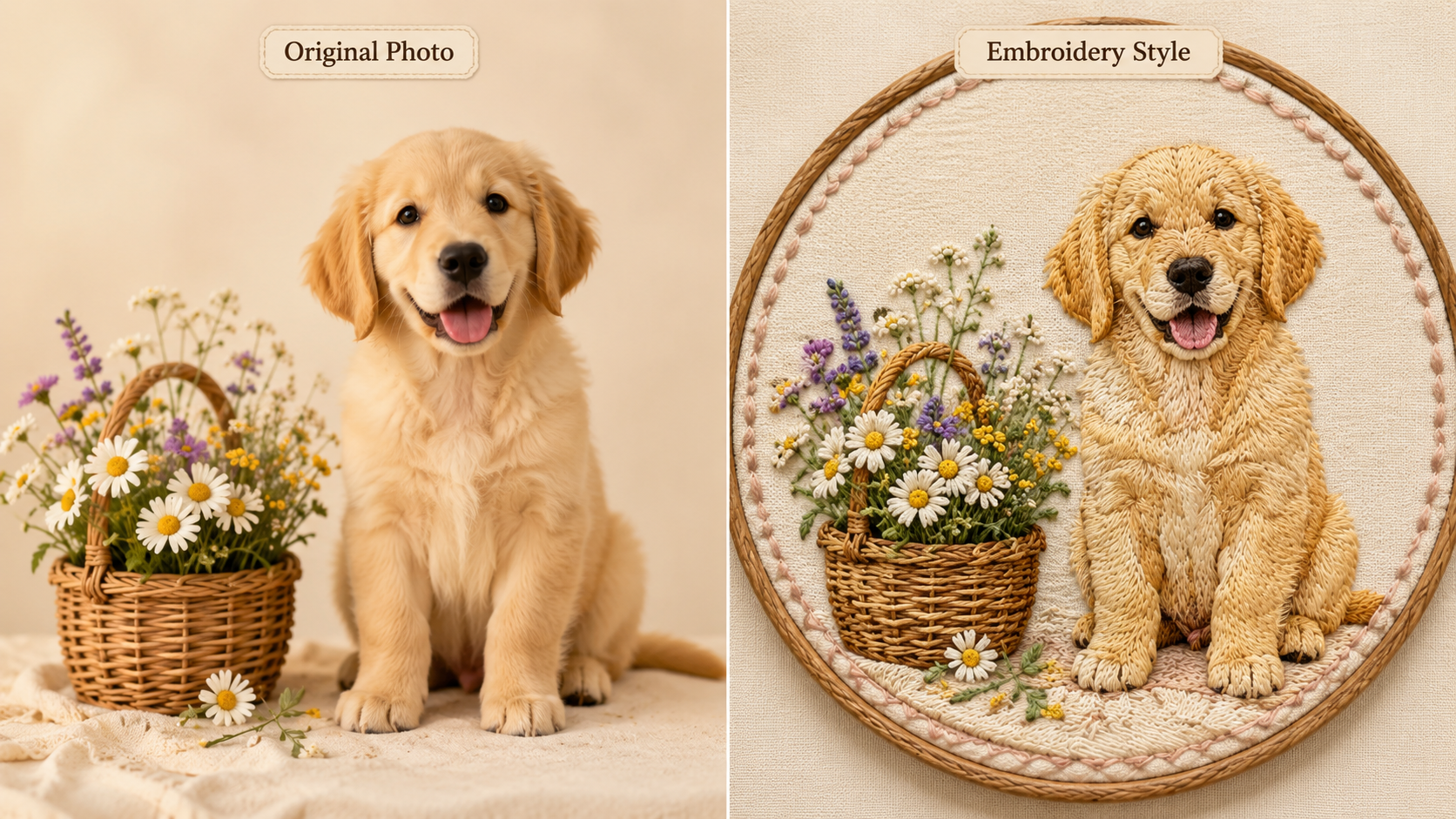
Patch designers, small apparel brands, craft enthusiasts, anyone making promotional products or gift mockups — this gives you a quick way to see how an idea translates to stitched artwork before spending hours on production.
Getting More From the Photos You Already Have
These tools share a practical thread: they let you do more with images already on your phone or hard drive. A product photo becomes a lifestyle scene. A portrait becomes part of a creative composition. A pet photo becomes embroidery artwork. A rough idea becomes something you can actually show someone.
Good source photos still produce better results, and some compositions take a couple of tries. But instead of treating every image edit as a multi-step design project, Pixlio turns it into something you can try on a lunch break.