Throughout 2025, AI music tools have moved from Twitter demos to production pipelines. What creators now debate is not whether the technology works, but whether working with it feels like collaboration or like pulling a lever on a slot machine. That question of control—over structure, over vocal character, over the boundaries between verse and chorus—has become the true dividing line between generators that serve serious projects and those that merely impress in isolation. To understand where that line currently sits, I tested the AI Song Generator alongside two of the most cited browser-based alternatives, evaluating not general quality but one specific variable: how much creative intent survives the journey from prompt to playback.
Three Generators, One Focus: The Structure-to-Output Pipeline
The tools selected for this comparison—AISong, Suno, and Udio—all produce full songs with vocals and instrumentation from a browser. Suno leads the market in volume and brand recognition. Udio has earned a reputation for vocal fidelity and fine-grained extension workflows. AISong sits at a different point on the control spectrum, one that surfaces structural decisions in the configuration panel rather than leaving them implicit. My testing concentrated on a single lyric-first workflow: I provided the same original lyrics with section markers to each platform, asked for a mid-tempo indie-folk treatment, and documented how faithfully each tool mapped the verse-chorus-bridge architecture onto the generated audio.
Structural Control: How Section Intent Survives Generation
The test lyrics contained a clear verse, a repeating chorus, a bridge, and an outro. When I fed them into Suno’s Custom Mode, the output delivered a complete song with the correct lyrical sequence, but the musical arrangement sometimes blurred the boundary between verse and pre-chorus, smoothing transitions into a continuous flow that worked emotionally but sacrificed structural distinction. In multiple generations, the bridge was treated less as a departure and more as a slight dynamic dip. This approach favors accessibility but reduces the user’s ability to enforce a specific architecture.
Where AISong’s Custom Mode Differentiates Itself
AISong’s Custom Mode accepted the same section markers and generated an arrangement that observably shifted instrumentation and dynamics at the verse-to-chorus boundary. The bridge brought a harmonic turn that felt intentional rather than accidental, and the outro landed on a clear resolution. While not every generation was perfect—one attempt pushed the bridge into a key change that felt jarring rather than adventurous—the success rate for structural mapping was higher across my five trials. From a practical user perspective, the platform appeared to treat the section tags as firm structural directives rather than loose suggestions.
Model Transparency: Choosing Character Instead of Guessing
Suno and Udio both manage their model versions largely behind the scenes; users select a generation mode but rarely see a named model version with explicit tradeoffs. AISong surfaces a model selection panel that lists available engine versions, their maximum song length, and a brief character description. During my sessions, this visibility allowed me to intentionally choose a version known for experimental character when I wanted an unconventional arrangement, and to switch to a more predictable version for a client-facing draft. The choice becomes part of the creative decision rather than an invisible backend optimization.
How Model Choice Affects Real-World Output
When I generated the same prompt with two different AISong model versions, the first produced a polished, radio-friendly arrangement with clean vocal separation, while the second delivered a rawer mix with more prominent rhythmic eccentricities. Both were usable, but for different contexts. This level of agency over sonic personality is absent from Suno and Udio in their current form, where the model behaves as a single decision engine that users can nudge with prompts but cannot fundamentally redirect.
Workflow Integration: What Happens After Generation
All three platforms deliver mixed stereo files without native stem separation. Udio’s clip-based interface encourages extension and chaining, making it suitable for users who want to build a track piece by piece. Suno’s one-shot full-song approach minimizes friction at the cost of section-level editing. AISong splits the difference with its Simple Mode for fast full-track generation and Custom Mode for users who want structural input without the manual assembly Udio requires. The inline waveform preview on AISong, which allows auditioning before download, saved me from importing flawed takes on multiple occasions, a small but meaningful workflow efficiency that neither Suno nor Udio emphasizes in their current interface.
How the Platform Guides First-Time Users Through Creation
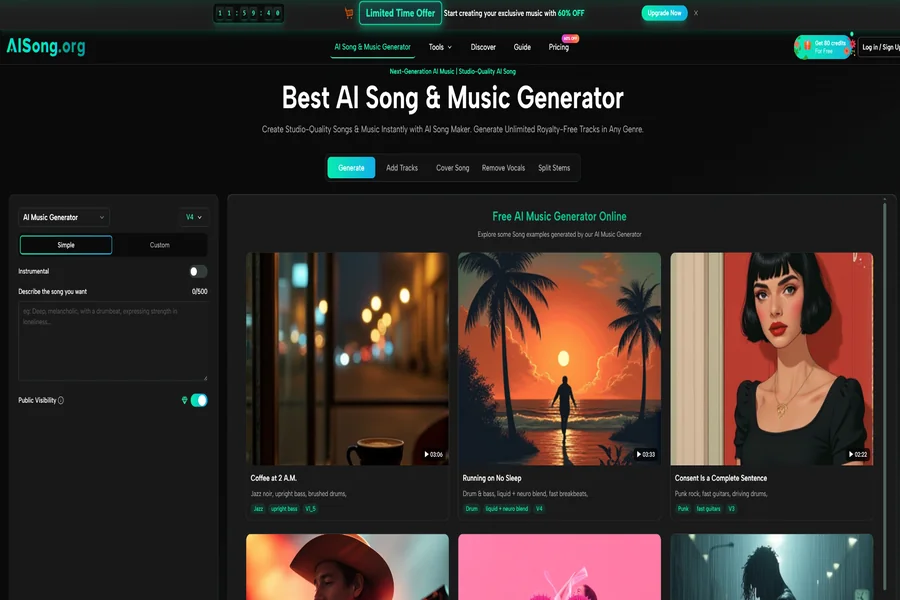
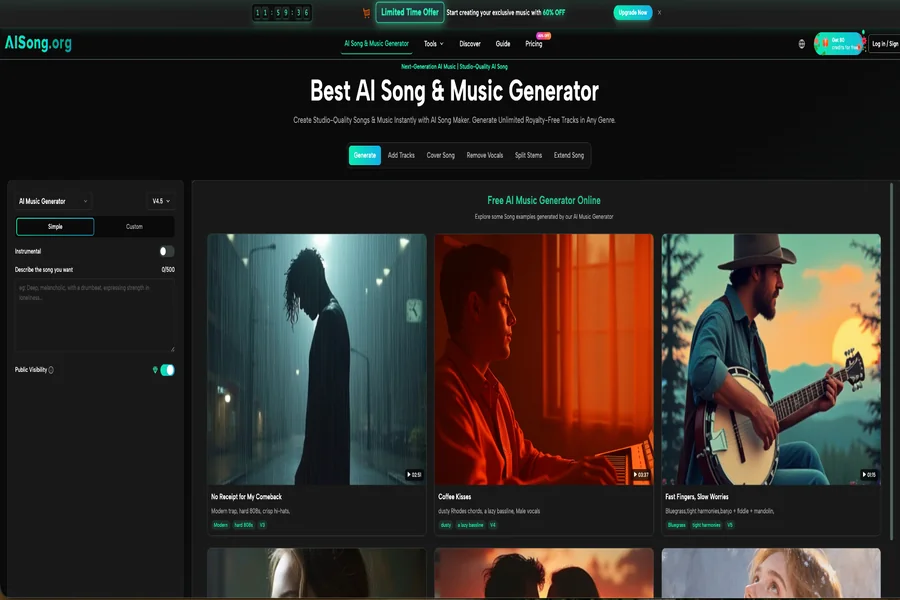
AISong’s interface follows a left-to-right sequence that mirrors how most creators think about building a track: describe first, configure second, generate third. There are no nested menus or hidden panels, which kept my attention on the creative decision rather than on interface navigation.
Step 1: Writing a Prompt or Supplying Lyrics
The main input field accepts both free-text descriptions and structured lyrics. When I entered my original lyrics with section labels, the system recognized the formatting immediately and shifted into a mode that prioritized structural fidelity. For users without ready lyrics, the built-in lyric generator can produce a full song structure that serves as a starting point.
What Makes a Prompt Work on the First Attempt
Prompts that included a genre, a tempo hint, and one instrumental texture cue produced results that matched the brief significantly better than vague mood-only descriptions. Across all my trials, specificity at the instrumentation level—mentioning a specific drum pattern or a lead instrument—was the single most effective way to steer the output toward a usable track without requiring regeneration.
Step 2: Choosing Between Simple Mode and Custom Mode
The generation panel presents two side-by-side options. Simple Mode handles lyrics, arrangement, and production in one pass, ideal for users who need a complete track quickly and are comfortable delegating creative decisions to the AI. Custom Mode requires the user to supply lyrics but offers noticeably tighter mapping of section labels to musical shifts.
When Custom Mode Is Worth the Extra Effort
For my lyric-first test, Custom Mode produced an arrangement that respected the intended structure on four out of five attempts. Simple Mode, applied to a separate instrumental brief, delivered a well-mixed underscore on the first generation. The decision between the two modes is essentially a decision about how much structural authority the user wants to retain, and the platform makes that tradeoff visible rather than hiding it behind a single button.
Step 3: Auditioning, Regenerating, and Downloading
Once generation completes, a waveform preview appears inline. I could listen to the full track, evaluate whether it met the brief, and either download immediately or regenerate with a modified prompt. The download delivers a standard compressed audio file ready for timeline placement.
The Preview as a Quality Gate
The inline preview caught issues early. On one generation, the hi-hat pattern was noticeably busier than I wanted for a voiceover application, and I caught it within seconds of playback. Without the preview, I would have downloaded the file, imported it into a video editor, and only then discovered the problem. That feedback loop kept the total time from prompt to usable file under ten minutes across most tasks.
Where the Three Tools Diverge on Creative Agency
| Dimension | AISong | Suno | Udio |
| Structural control mechanism | Custom Mode with section-marker recognition | Custom Mode with lyrics, but softer section boundaries | Clip extension and manual assembly |
| Model transparency | Visible version menu with character notes | Limited user-facing model selection | Not prominently selectable |
| Vocal character control | Prompt-driven, model-dependent | Prompt-driven, v5 models improved | Prompt-driven, strongest vocal realism |
| Best suited for | Lyric-first songwriters, quick prototyping, structural control | Volume content creation, rapid ideation | High-fidelity vocal projects, patient editors |
| Stem or multi-track export | No | No | No |
The table maps each tool to a creative priority rather than declaring superiority. Suno optimizes for speed and volume, Udio for fidelity and edit precision, and AISong for the middle ground where structural intent matters but full manual assembly feels like overkill.
Limitations That Remain Across the Category
All three tools output mixed stereo files with no native stem separation, which means isolating the bass or drums for post-mixing still requires an external tool or AI stem splitter. Vocal synthesis, while dramatically improved in the past year, continues to show a ceiling in emotional nuance; the performances are pitch-accurate and intelligible but rarely transcend the level of a competent session singer sight-reading unfamiliar material. Complex genre fusions that combine two or more distinct traditions frequently default to the dominant element, and achieving a true hybrid requires multiple prompt iterations and a willingness to accept partial results.
When the AI Song Maker Fits a Specific Creative Role
For the lyric-first songwriter who is not a multi-instrumentalist, the AI Song Maker does something functionally distinct from Suno’s fire-and-forget model and Udio’s clip-by-clip assembly. It treats the supplied section markers as structural instructions and applies them with enough discipline that the output can serve as a credible arrangement draft. For the content creator who needs a backing track that fits a brief without entering the licensing maze of royalty-free libraries, the Simple Mode pipeline delivers a usable file in the time it takes to write a descriptive sentence. The tool is not a replacement for a producer, a mixer, or a vocalist, but in a world where most AI generators ask creators to trade control for convenience, having a visible dial that lets you choose how much control to keep is a meaningful, and currently underrated, design decision.